How to Track Partial Payments and Outstanding Balances Without a Spreadsheet
According to Intuit's 2025 Small Business Late Payments Report, 56 percent of US small businesses are owed money from unpaid invoices, averaging $17,500 per business. That is not because contractors do bad work. It is because most of them are tracking payments in their head, in a notebook, or in a spreadsheet that stopped being useful three jobs ago. When you cannot answer "who owes me what right now" in five seconds, money slips through the cracks.
The spreadsheet works until it does not
Every contractor starts the same way. You create a spreadsheet with columns for client name, job total, amount paid, balance due. For two or three active jobs, it works fine. You update it after each payment, the numbers add up, and you feel organized.
Then you hit five active jobs. One client pays a deposit. Another sends a progress payment that is $200 short. A third pays the full amount but you forgot to log it. The spreadsheet does not know about your invoices, so you are cross-referencing two documents manually. By the time you have eight or ten open jobs, the spreadsheet is a liability. You are spending 20 minutes a week maintaining it, and you still are not sure the numbers are right.
The core problem is simple: a spreadsheet is disconnected from your actual invoices. Every payment has to be entered twice, once in whatever tool you use for invoicing and once in the tracker. The moment you skip an entry or fat-finger a number, your outstanding balance is wrong. And a wrong number is worse than no number, because it gives you false confidence.
What happens when you lose track
The real cost of bad payment tracking is not the time spent maintaining a spreadsheet. It is the money you never collect. We talk to contractors regularly who discover at the end of a job that a progress payment was never made. The client thought they paid it. The contractor thought they received it. Nobody checked until the final invoice went out and the math did not add up.
By that point, the conversation is awkward. "I think you still owe me $2,400 from the framing phase" is a hard sentence to say with confidence when your records are a mess. Some contractors eat the loss rather than have the conversation. Others send the invoice and hope for the best, but the client pushes back because weeks or months have passed. According to the SBA, cash flow problems are one of the top reasons small businesses fail. Losing track of $2,000 here and $3,000 there adds up fast.
Milestone payments need milestone tracking
On any job over a few thousand dollars, most contractors use some kind of milestone payment structure. A deposit before work starts, a progress payment at rough-in or framing, and a final payment at completion. This is standard and smart. It protects your cash flow and reduces the risk of a large unpaid balance at the end of the project.
But milestone payments only work if both sides know exactly where they stand. The client needs to know what they have paid and what is still due. You need to know the same thing without digging through bank statements. When each milestone has its own invoice tied back to the original estimate, the payment history is automatic. The deposit invoice shows paid. The progress invoice shows paid. The final invoice shows the remaining balance. There is no math to do and nothing to cross-reference.
The contractors who get into payment disputes almost always have one thing in common: their milestone payments were tracked informally. A Venmo here, a check there, a "we will settle up at the end" conversation that nobody wrote down.
A dashboard beats a spreadsheet every time
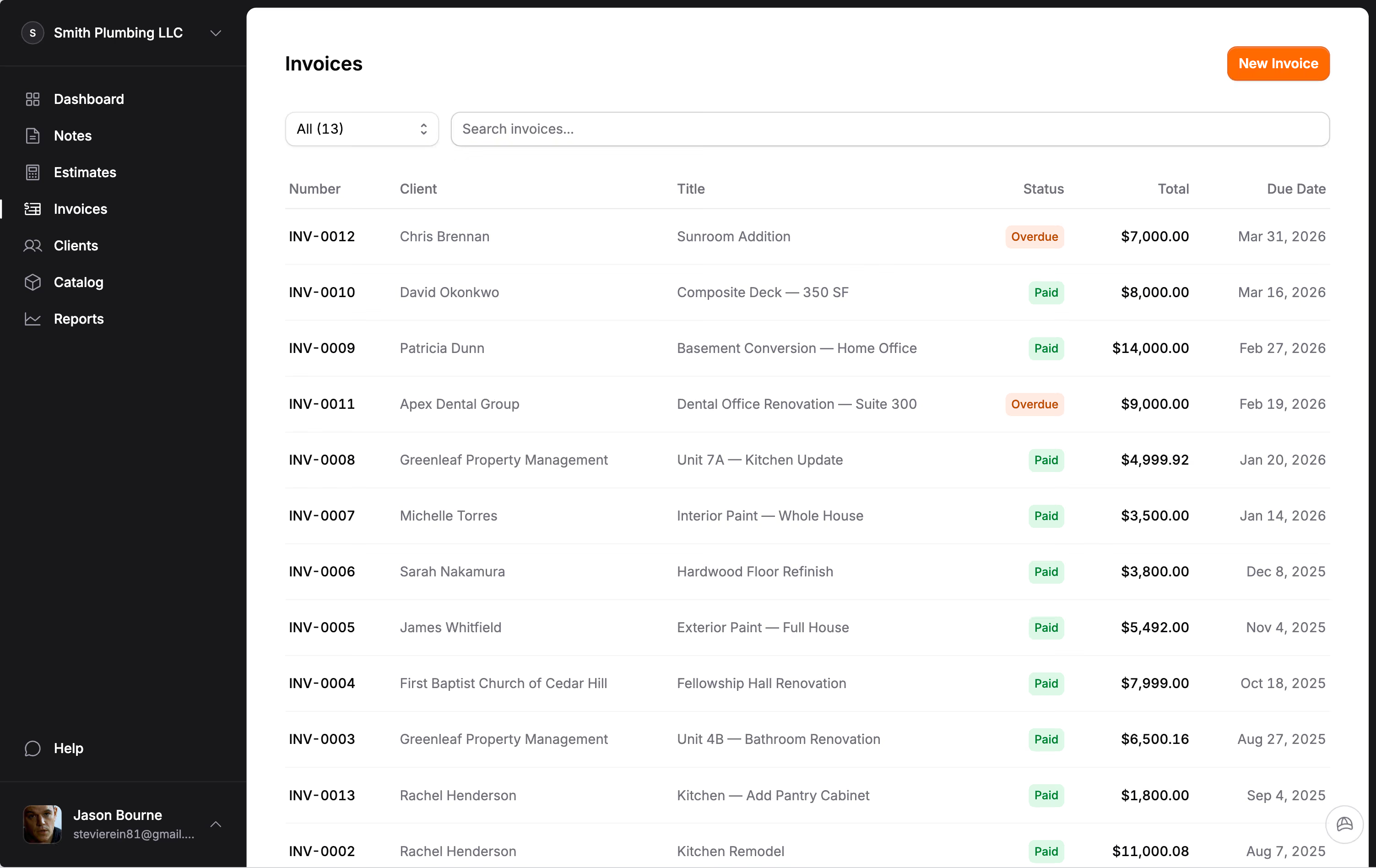
The difference between a spreadsheet and a proper dashboard is not complexity. It is connection. A dashboard that is connected to your invoices and payments updates itself. When a client pays an invoice through a payment link, the balance adjusts automatically. When you record a check, the outstanding amount drops. You are not maintaining a second document. You are looking at the truth.
This matters most on Monday morning when you are planning your week. A quick look at your dashboard tells you which clients owe money, how much, and how long the invoice has been outstanding. That is the information you need to decide whether to send a reminder, make a phone call, or hold off on ordering materials for the next phase. A spreadsheet can technically show you the same data, but only if every entry is current and correct. And on a busy week, it never is.
Reconciling payments against invoices
Reconciliation sounds like an accounting term, but for contractors it boils down to one question: does the amount the client paid match the amount the invoice says they owe? When those two numbers match, the job is clean. When they do not, you need to know immediately.
Partial payments are where things get messy. A client sends $3,000 on a $4,800 invoice. Is that the deposit? Is it a partial payment on the full amount? Did they deduct something they thought was included? Without a system that records the payment against a specific invoice, you are guessing. And guessing leads to either awkward phone calls or money left on the table.
The fix is not more columns in a spreadsheet. It is a system where payments are linked to invoices by default. Jobkore does this automatically. When a payment comes in, it is recorded against the invoice it belongs to. The remaining balance updates in real time. If a client pays $3,000 on a $4,800 invoice, you see $1,800 outstanding with zero manual entry. That clarity is what keeps you from writing off money you are owed.
Knowing your outstanding balance at any moment
Here is the number that matters more than almost anything else in your business: your total outstanding balance. That is the sum of every unpaid invoice across every active job. It is the money you have earned but have not received yet. For most contractors, that number is larger than they think.
When you know your outstanding balance at any moment, you can make better decisions about everything. Should you take on a new job or focus on collecting what you are owed? Can you afford to order materials for the next phase, or do you need a payment to come in first? Is your business actually profitable this month, or does it just feel that way because you have been busy?
A spreadsheet can give you this number if you spend the time to update it. A connected invoicing system gives it to you every time you log in. The contractors we work with who switched from spreadsheets to a real payment tracking system consistently say the same thing: they had no idea how much money was sitting out there uncollected. Once they could see it, they started collecting it.
The system is the solution
Tracking partial payments and outstanding balances is not a skill problem. It is a systems problem. Contractors are good at building things. They are not supposed to be good at maintaining parallel spreadsheets. When the tracking is built into the same tool you use to send estimates and invoices, it happens automatically. You do not have to remember to update it, because there is nothing to update.
If you are running more than a couple of jobs at a time and you cannot tell someone your exact outstanding balance right now, that is the gap. Close it, and you will collect more of the money you have already earned.
Frequently Asked Questions
How should contractors track partial payments?
Each payment should be recorded against the specific invoice it applies to, with the remaining balance automatically updated. For milestone billing, each phase gets its own invoice tied to the original estimate. A dashboard that shows all active jobs with their paid and unpaid amounts gives you the full picture without opening a spreadsheet.
What is the best way for contractors to track who owes them money?
A single dashboard view that shows every active project, the total contracted amount, payments received, and the outstanding balance. Spreadsheets require manual updates and break when you forget to log a payment. Dedicated invoicing tools track this automatically and update in real time as payments come in.
How do milestone payments work for contractors?
You divide the project total into payments tied to specific stages of work: a deposit before starting, a progress payment at rough-in or framing, and a final payment at completion. Each milestone gets its own invoice. The client pays as they see progress, and your cash flow stays steady throughout the project instead of waiting for one large payment at the end.
How much money do contractors lose from poor payment tracking?
According to Intuit, 56 percent of US small businesses are owed an average of $17,500 in unpaid invoices. For contractors, a significant portion of that is not bad clients but lost invoices, forgotten follow-ups, and payments that were received but never recorded against the right job. Better tracking recovers money that is already owed to you.